Quick Start Guide

In this notebook, we will go through how to use psiclone, a library for streamline topology analysis.

Basic Information and Loading the Library

This tutorial assumes psiclone>=0.4.2. You can check the version of psiclone using either pip show or inspecting psiclone.version.

As of April 1, 2025, the latest version is v0.4.2.

%pip show psiclone
Name: psiclone
Version: 0.4.2
Summary: Toolbox for Topological Flow Data Analysis using COT Representations
Home-page: https://github.com/t-uda/psiclone
Author: Tomoki Uda
Author-email: uda0@sci.u-toyama.ac.jp
License: MIT
Location: /opt/build/repo/.venv/lib/python3.12/site-packages
Requires: matplotlib, msgpack, nbformat, networkx, numpy, plotly, scipy
Required-by: 
Note: you may need to restart the kernel to use updated packages.
import psiclone

help(psiclone.version)
Help on module psiclone.version in psiclone:

NAME
    psiclone.version

FUNCTIONS
    version()

VERSION
    0.4.2

FILE
    /opt/build/repo/.venv/lib/python3.12/site-packages/psiclone/version.py

If you are unsure, try using help(...) as shown above. (This is a basic piece of advice applicable beyond Python.)

help(psiclone)
Help on package psiclone:

NAME
    psiclone - Toolbox for Topological Flow Data Analysis using COT Representations

PACKAGE CONTENTS
    compatibility (package)
    cot
    data (package)
    experimental (package)
    psi2tree
    reeb (package)
    test (package)
    util (package)
    version
    visualization (package)

FILE
    /opt/build/repo/.venv/lib/python3.12/site-packages/psiclone/__init__.py

As you can see, psiclone consists of several subpackages. Here, we’ll preload reeb and visualization.

import psiclone.reeb
import psiclone.visualization

Handling Input Data Formats

Loading Data

Now let’s move on to the full tutorial. For reading and writing data, numpy is convenient. For visualization, matplotlib and networkx are also useful.

import matplotlib.pyplot as plt
import networkx
import numpy

Input Data: GrayscaleImage

A typical input for computing a Reeb graph is an n×m real-valued scalar array. This is handled by the GrayscaleImage class. Let’s take a look at its help page first.

help(psiclone.data.GrayscaleImage)
Help on class GrayscaleImage in module psiclone.data.image:

class GrayscaleImage(psiclone.data.abstract_graph.AbstractGraph)
 |  GrayscaleImage(array, *, adjacency=array([[0, 1],
 |         [1, 0]], dtype=int32))
 |
 |  A `GrayscaleImage` object represents an `(n, m)`-shaped scalar array.
 |  This object inherits from `AbstractGraph` and is regarded as a lattice graph.
 |
 |  Nodes, edges and link_table are compatible with those of `Geometry` graphs.
 |  Nodes are pixels locating at the 2D integer lattice. Compared to typical
 |  lattice graphs, the adjacency of `GrayscaleImage` is generalized in the sense
 |  that any lattice point is connected to points in its reference ball neighborhood.
 |  The ball neighborhood is specified by `adjacency` parameter and no entities
 |  of the links are maintained. This nontypical adjacency structure is intended
 |  to deal with topological noises in grayscale images, and to avoid overuse of
 |  memory in the case where the datasize and the ball neighborhood are large.
 |
 |  Parameters
 |  ---------
 |  array : `numpy.ndarray`
 |      A two-dimensional numeric array representing a gray-scale image.
 |
 |  adjacency : `numpy.ndarray`, default=`four_points_adjacency()`
 |      A two-dimensional numeric array representing the lattice adjacency.
 |
 |  Notes
 |  -----
 |  The `adjacency` parameter is intended to use one of the following functions generating such an array.
 |
 |  - `box_adjacency(r)`: Connects all lattice points within a box of radius `r`.
 |  - `ball_adjacency(p, r)`: Connects all lattice points within an L^p ball of radius `r`.
 |  - `four_points_adjacency()`: Equivalent to `ball_adjacency(1, 1)` (default).
 |  - `eight_points_adjacency()`: Equivalent to `box_adjacency(1)`
 |
 |  Method resolution order:
 |      GrayscaleImage
 |      psiclone.data.abstract_graph.AbstractGraph
 |      builtins.object
 |
 |  Methods defined here:
 |
 |  __init__(self, array, *, adjacency=array([[0, 1],
 |         [1, 0]], dtype=int32))
 |      Initialize self.  See help(type(self)) for accurate signature.
 |
 |  is_in_bound(self, i, j)
 |
 |  to_geometry(self)
 |      Convert a given 2D array `pict` to a grid geometry.
 |      An edge in a grid geometry links four-point neighbors,
 |      whereas a node in a grid geometry consists of properties
 |      `{'x': i, 'y': j, 'level': pict[i, j], 'geotype': 0}`.
 |
 |      Returns
 |      -------
 |      geometry : `psiclone.data.Geometry`
 |          A grid geometry.
 |
 |  ----------------------------------------------------------------------
 |  Class methods defined here:
 |
 |  create_graph()
 |      Factory method of GrayscaleImage.
 |
 |  ----------------------------------------------------------------------
 |  Readonly properties defined here:
 |
 |  data
 |
 |  edges
 |
 |  link_table
 |
 |  nodes
 |
 |  ----------------------------------------------------------------------
 |  Data and other attributes defined here:
 |
 |  MockLinkTable = <class 'psiclone.data.image.GrayscaleImage.MockLinkTab...
 |      A mock link table of GrayscaleImage without maintaining its Edge entities.
 |
 |
 |  __abstractmethods__ = frozenset()
 |
 |  ----------------------------------------------------------------------
 |  Methods inherited from psiclone.data.abstract_graph.AbstractGraph:
 |
 |  to_network(self)
 |
 |  ----------------------------------------------------------------------
 |  Data descriptors inherited from psiclone.data.abstract_graph.AbstractGraph:
 |
 |  __dict__
 |      dictionary for instance variables
 |
 |  __weakref__
 |      list of weak references to the object

Notice the line in the help output that says GrayscaleImage(array, *, ......). This indicates how the class is initialized, showing that you can create an instance by passing an array as an argument. Let’s try it in practice.

data = numpy.arange(12).reshape((3, 4))
img = psiclone.data.GrayscaleImage(data)

A GrayscaleImage object inherits from AbstractGraph and thus has a graph structure.

img.nodes
[Point(id=np.int64(0), level=np.int64(0), x=np.int64(0), y=np.int64(0), geotype=np.int64(1), order=np.float64(-2.498091544796509)),
 Point(id=np.int64(1), level=np.int64(1), x=np.int64(1), y=np.int64(0), geotype=np.int64(1), order=np.float64(-2.1587989303424644)),
 Point(id=np.int64(2), level=np.int64(2), x=np.int64(2), y=np.int64(0), geotype=np.int64(1), order=np.float64(-1.5707963267948966)),
 Point(id=np.int64(3), level=np.int64(3), x=np.int64(3), y=np.int64(0), geotype=np.int64(1), order=np.float64(-0.982793723247329)),
 Point(id=np.int64(4), level=np.int64(4), x=np.int64(0), y=np.int64(1), geotype=np.int64(1), order=np.float64(-2.896613990462929)),
 Point(id=np.int64(5), level=np.int64(5), x=np.int64(1), y=np.int64(1), geotype=np.int64(0), order=np.float64(nan)),
 Point(id=np.int64(6), level=np.int64(6), x=np.int64(2), y=np.int64(1), geotype=np.int64(0), order=np.float64(nan)),
 Point(id=np.int64(7), level=np.int64(7), x=np.int64(3), y=np.int64(1), geotype=np.int64(1), order=np.float64(-0.4636476090008061)),
 Point(id=np.int64(8), level=np.int64(8), x=np.int64(0), y=np.int64(2), geotype=np.int64(1), order=np.float64(2.896613990462929)),
 Point(id=np.int64(9), level=np.int64(9), x=np.int64(1), y=np.int64(2), geotype=np.int64(1), order=np.float64(2.677945044588987)),
 Point(id=np.int64(10), level=np.int64(10), x=np.int64(2), y=np.int64(2), geotype=np.int64(1), order=np.float64(1.5707963267948966)),
 Point(id=np.int64(11), level=np.int64(11), x=np.int64(3), y=np.int64(2), geotype=np.int64(1), order=np.float64(0.4636476090008061))]
list(img.edges)
[<psiclone.data.graph.Edge at 0x7fcb2faafdd0>,
 <psiclone.data.graph.Edge at 0x7fcb2f699040>,
 <psiclone.data.graph.Edge at 0x7fcb2ff2e120>,
 <psiclone.data.graph.Edge at 0x7fcb2f6daf60>,
 <psiclone.data.graph.Edge at 0x7fcb2f6d8770>,
 <psiclone.data.graph.Edge at 0x7fcb4eb89a60>,
 <psiclone.data.graph.Edge at 0x7fcb4eb89910>,
 <psiclone.data.graph.Edge at 0x7fcb3383c710>,
 <psiclone.data.graph.Edge at 0x7fcb2f2898e0>,
 <psiclone.data.graph.Edge at 0x7fcb3383e720>,
 <psiclone.data.graph.Edge at 0x7fcb2f2894c0>,
 <psiclone.data.graph.Edge at 0x7fcb2f289910>,
 <psiclone.data.graph.Edge at 0x7fcb2f2895b0>,
 <psiclone.data.graph.Edge at 0x7fcb2f289940>,
 <psiclone.data.graph.Edge at 0x7fcb4eb95be0>,
 <psiclone.data.graph.Edge at 0x7fcb4eb95c40>,
 <psiclone.data.graph.Edge at 0x7fcb4eb95bb0>]

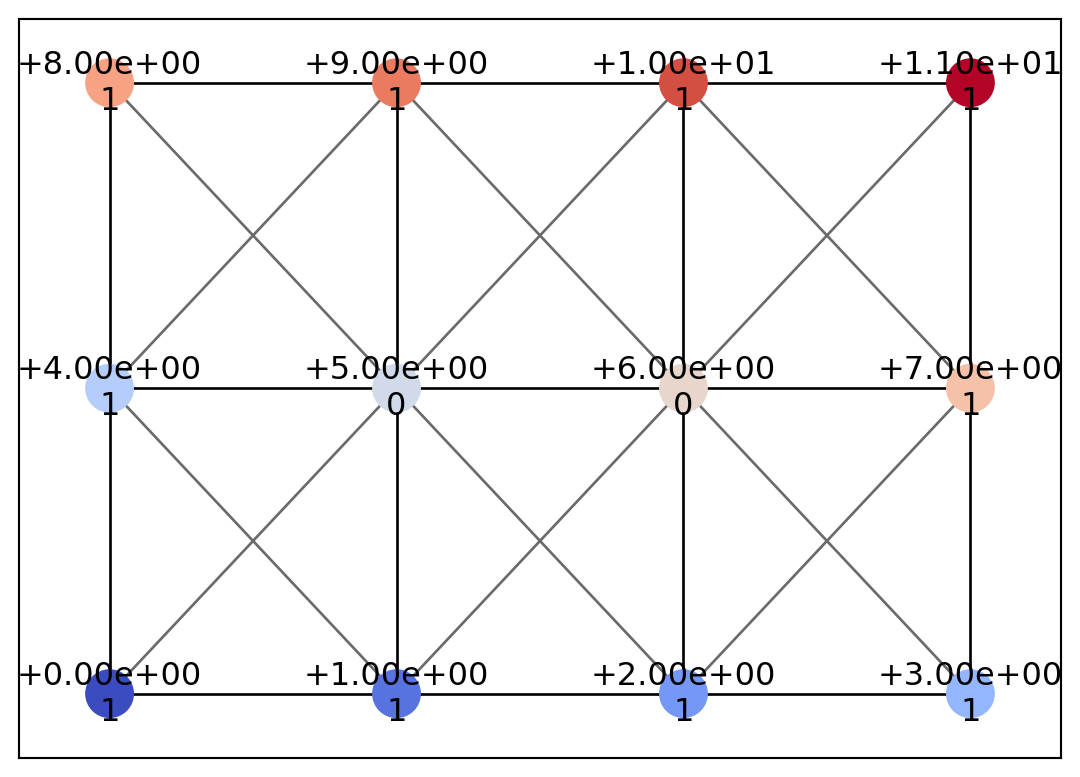
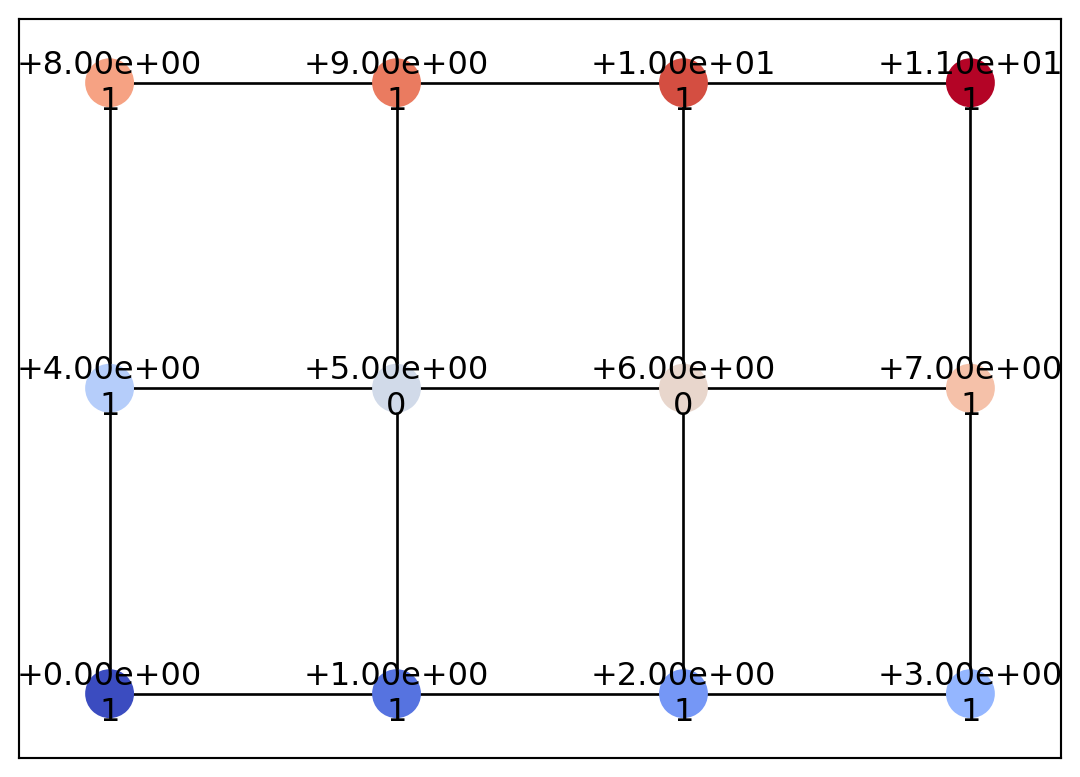
Since this is not very intuitive as-is, let’s visualize the graph structure. To visualize the input data structure, we can use psiclone.visualization.draw_geometry.

psiclone.visualization.draw_geometry(img)

As shown above, numerical array data with shape (3, 4) is represented as a graph structure. The GrayscaleImage class represents a lattice graph specialized for n×m numerical data such as images.

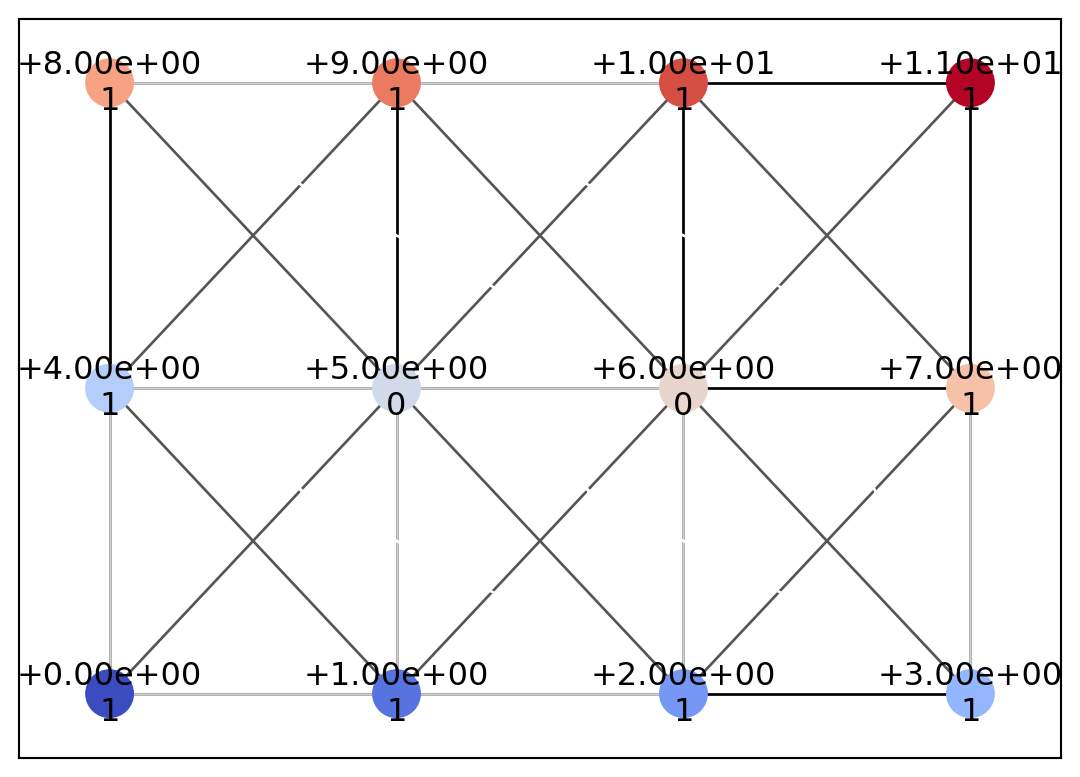
In fact, by specifying the second argument adjacency, you can use a different adjacency relation. The following code demonstrates the use of an eight-neighbor adjacency relation.

img = psiclone.data.GrayscaleImage(data, adjacency=psiclone.data.eight_points_adjacency())
psiclone.visualization.draw_geometry(img, edge_vmin=-2, edge_vmax=-1)

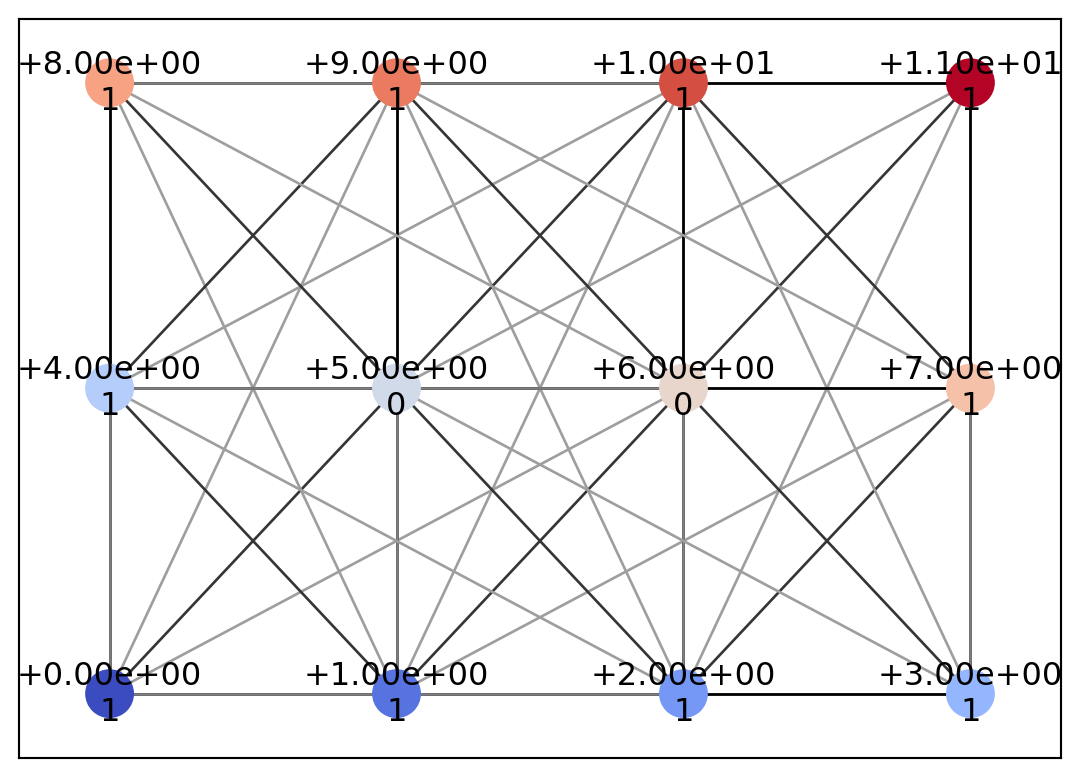
When handling data with a high level of noise, it is useful either to remove the noise in preprocessing or to choose an adjacency relation appropriate to the noise scale. In many cases, using the eight-neighbor adjacency as in the example above is sufficient. The following example shows how to specify yet another adjacency relation.

img = psiclone.data.GrayscaleImage(data, adjacency=psiclone.data.ball_adjacency(2, 2.5))
psiclone.visualization.draw_geometry(img, edge_vmin=-3, edge_vmax=-1)

Input Data: Geometry

More generally, psiclone.data.Geometry, which represents a graph with coordinates, height values (and several other properties), can also be used as input data. In fact, it can be obtained by converting from a GrayscaleImage.

geom = img.to_geometry()
geom.link_table
{Point(id=np.int64(0), level=np.int64(0), x=np.int64(0), y=np.int64(0), geotype=np.int64(1), order=np.float64(-2.498091544796509)): [<psiclone.data.graph.Edge at 0x7fcb334643e0>,
  <psiclone.data.graph.Edge at 0x7fcb33465a90>,
  <psiclone.data.graph.Edge at 0x7fcb33466090>,
  <psiclone.data.graph.Edge at 0x7fcb33465e50>,
  <psiclone.data.graph.Edge at 0x7fcb33467380>,
  <psiclone.data.graph.Edge at 0x7fcb334666f0>,
  <psiclone.data.graph.Edge at 0x7fcb334655b0>],
 Point(id=np.int64(1), level=np.int64(1), x=np.int64(1), y=np.int64(0), geotype=np.int64(1), order=np.float64(-2.1587989303424644)): [<psiclone.data.graph.Edge at 0x7fcb334643e0>,
  <psiclone.data.graph.Edge at 0x7fcb334664b0>,
  <psiclone.data.graph.Edge at 0x7fcb33467710>,
  <psiclone.data.graph.Edge at 0x7fcb33465df0>,
  <psiclone.data.graph.Edge at 0x7fcb33465b20>,
  <psiclone.data.graph.Edge at 0x7fcb33466a50>,
  <psiclone.data.graph.Edge at 0x7fcb33467aa0>,
  <psiclone.data.graph.Edge at 0x7fcb33465640>,
  <psiclone.data.graph.Edge at 0x7fcb33464bc0>,
  <psiclone.data.graph.Edge at 0x7fcb33467800>],
 Point(id=np.int64(2), level=np.int64(2), x=np.int64(2), y=np.int64(0), geotype=np.int64(1), order=np.float64(-1.5707963267948966)): [<psiclone.data.graph.Edge at 0x7fcb33465a90>,
  <psiclone.data.graph.Edge at 0x7fcb334664b0>,
  <psiclone.data.graph.Edge at 0x7fcb33465370>,
  <psiclone.data.graph.Edge at 0x7fcb33466960>,
  <psiclone.data.graph.Edge at 0x7fcb33467ad0>,
  <psiclone.data.graph.Edge at 0x7fcb33465820>,
  <psiclone.data.graph.Edge at 0x7fcb334644a0>,
  <psiclone.data.graph.Edge at 0x7fcb335ed100>,
  <psiclone.data.graph.Edge at 0x7fcb335ef740>,
  <psiclone.data.graph.Edge at 0x7fcb335edb20>],
 Point(id=np.int64(3), level=np.int64(3), x=np.int64(3), y=np.int64(0), geotype=np.int64(1), order=np.float64(-0.982793723247329)): [<psiclone.data.graph.Edge at 0x7fcb33467710>,
  <psiclone.data.graph.Edge at 0x7fcb33465370>,
  <psiclone.data.graph.Edge at 0x7fcb33467830>,
  <psiclone.data.graph.Edge at 0x7fcb335efdd0>,
  <psiclone.data.graph.Edge at 0x7fcb335ef5f0>,
  <psiclone.data.graph.Edge at 0x7fcb3346c7d0>,
  <psiclone.data.graph.Edge at 0x7fcb3346cc80>],
 Point(id=np.int64(4), level=np.int64(4), x=np.int64(0), y=np.int64(1), geotype=np.int64(1), order=np.float64(-2.896613990462929)): [<psiclone.data.graph.Edge at 0x7fcb33466090>,
  <psiclone.data.graph.Edge at 0x7fcb33465df0>,
  <psiclone.data.graph.Edge at 0x7fcb33466960>,
  <psiclone.data.graph.Edge at 0x7fcb335edbb0>,
  <psiclone.data.graph.Edge at 0x7fcb3346cb90>,
  <psiclone.data.graph.Edge at 0x7fcb334ed160>,
  <psiclone.data.graph.Edge at 0x7fcb334ef4a0>,
  <psiclone.data.graph.Edge at 0x7fcb334ed970>],
 Point(id=np.int64(5), level=np.int64(5), x=np.int64(1), y=np.int64(1), geotype=np.int64(0), order=np.float64(nan)): [<psiclone.data.graph.Edge at 0x7fcb33465e50>,
  <psiclone.data.graph.Edge at 0x7fcb33465b20>,
  <psiclone.data.graph.Edge at 0x7fcb33467ad0>,
  <psiclone.data.graph.Edge at 0x7fcb33467830>,
  <psiclone.data.graph.Edge at 0x7fcb335edbb0>,
  <psiclone.data.graph.Edge at 0x7fcb3346ce90>,
  <psiclone.data.graph.Edge at 0x7fcb334ed8b0>,
  <psiclone.data.graph.Edge at 0x7fcb334eeed0>,
  <psiclone.data.graph.Edge at 0x7fcb334ec830>,
  <psiclone.data.graph.Edge at 0x7fcb334edf10>,
  <psiclone.data.graph.Edge at 0x7fcb334ed910>],
 Point(id=np.int64(6), level=np.int64(6), x=np.int64(2), y=np.int64(1), geotype=np.int64(0), order=np.float64(nan)): [<psiclone.data.graph.Edge at 0x7fcb33467380>,
  <psiclone.data.graph.Edge at 0x7fcb33466a50>,
  <psiclone.data.graph.Edge at 0x7fcb33465820>,
  <psiclone.data.graph.Edge at 0x7fcb335efdd0>,
  <psiclone.data.graph.Edge at 0x7fcb3346cb90>,
  <psiclone.data.graph.Edge at 0x7fcb3346ce90>,
  <psiclone.data.graph.Edge at 0x7fcb334ecf20>,
  <psiclone.data.graph.Edge at 0x7fcb334effe0>,
  <psiclone.data.graph.Edge at 0x7fcb334ee930>,
  <psiclone.data.graph.Edge at 0x7fcb334ef080>,
  <psiclone.data.graph.Edge at 0x7fcb334ef170>],
 Point(id=np.int64(7), level=np.int64(7), x=np.int64(3), y=np.int64(1), geotype=np.int64(1), order=np.float64(-0.4636476090008061)): [<psiclone.data.graph.Edge at 0x7fcb33467aa0>,
  <psiclone.data.graph.Edge at 0x7fcb334644a0>,
  <psiclone.data.graph.Edge at 0x7fcb335ef5f0>,
  <psiclone.data.graph.Edge at 0x7fcb334ed8b0>,
  <psiclone.data.graph.Edge at 0x7fcb334ecf20>,
  <psiclone.data.graph.Edge at 0x7fcb334ef620>,
  <psiclone.data.graph.Edge at 0x7fcb334eefc0>,
  <psiclone.data.graph.Edge at 0x7fcb334ef1d0>],
 Point(id=np.int64(8), level=np.int64(8), x=np.int64(0), y=np.int64(2), geotype=np.int64(1), order=np.float64(2.896613990462929)): [<psiclone.data.graph.Edge at 0x7fcb334666f0>,
  <psiclone.data.graph.Edge at 0x7fcb33465640>,
  <psiclone.data.graph.Edge at 0x7fcb334ed160>,
  <psiclone.data.graph.Edge at 0x7fcb334eeed0>,
  <psiclone.data.graph.Edge at 0x7fcb334effe0>,
  <psiclone.data.graph.Edge at 0x7fcb334ec110>,
  <psiclone.data.graph.Edge at 0x7fcb334ece60>],
 Point(id=np.int64(9), level=np.int64(9), x=np.int64(1), y=np.int64(2), geotype=np.int64(1), order=np.float64(2.677945044588987)): [<psiclone.data.graph.Edge at 0x7fcb334655b0>,
  <psiclone.data.graph.Edge at 0x7fcb33464bc0>,
  <psiclone.data.graph.Edge at 0x7fcb335ed100>,
  <psiclone.data.graph.Edge at 0x7fcb334ef4a0>,
  <psiclone.data.graph.Edge at 0x7fcb334ec830>,
  <psiclone.data.graph.Edge at 0x7fcb334ee930>,
  <psiclone.data.graph.Edge at 0x7fcb334ef620>,
  <psiclone.data.graph.Edge at 0x7fcb334ec110>,
  <psiclone.data.graph.Edge at 0x7fcb334ee810>,
  <psiclone.data.graph.Edge at 0x7fcb334ef5f0>],
 Point(id=np.int64(10), level=np.int64(10), x=np.int64(2), y=np.int64(2), geotype=np.int64(1), order=np.float64(1.5707963267948966)): [<psiclone.data.graph.Edge at 0x7fcb33467800>,
  <psiclone.data.graph.Edge at 0x7fcb335ef740>,
  <psiclone.data.graph.Edge at 0x7fcb3346c7d0>,
  <psiclone.data.graph.Edge at 0x7fcb334ed970>,
  <psiclone.data.graph.Edge at 0x7fcb334edf10>,
  <psiclone.data.graph.Edge at 0x7fcb334ef080>,
  <psiclone.data.graph.Edge at 0x7fcb334eefc0>,
  <psiclone.data.graph.Edge at 0x7fcb334ece60>,
  <psiclone.data.graph.Edge at 0x7fcb334ee810>,
  <psiclone.data.graph.Edge at 0x7fcb334ec740>],
 Point(id=np.int64(11), level=np.int64(11), x=np.int64(3), y=np.int64(2), geotype=np.int64(1), order=np.float64(0.4636476090008061)): [<psiclone.data.graph.Edge at 0x7fcb335edb20>,
  <psiclone.data.graph.Edge at 0x7fcb3346cc80>,
  <psiclone.data.graph.Edge at 0x7fcb334ed910>,
  <psiclone.data.graph.Edge at 0x7fcb334ef170>,
  <psiclone.data.graph.Edge at 0x7fcb334ef1d0>,
  <psiclone.data.graph.Edge at 0x7fcb334ef5f0>,
  <psiclone.data.graph.Edge at 0x7fcb334ec740>]}
help(psiclone.data.geometry.Geometry)
Help on class Geometry in module psiclone.data.geometry:

class Geometry(psiclone.data.graph.Graph)
 |  A `Geometry` object models geometry of a collection of pixels with
 |  topological structure. An edge of `Geometry` has no properties,
 |  whereas a node of `Geometry` has the following properties.
 |  Note that this has nothing to do with geometric graphs in graph theory.
 |  In general, the edges are crossing and even not line segments.
 |
 |  Properties of Point
 |  -------------------
 |  id : int >= 0
 |  level : int, float
 |  x, y : int, float
 |  geotype : int >= 0
 |  order : int, float, optional
 |
 |  Note on the geotype property
 |  ----------------------------
 |  The geotype property may have any non-negative integer values.
 |  Geotype 0 is reserved for interior points.
 |  Geotype 1 is reserved for exterior points.
 |  Geotypes 2, 3, and so forth will be used for any other kind of geometric boundary points.
 |
 |  Method resolution order:
 |      Geometry
 |      psiclone.data.graph.Graph
 |      psiclone.data.abstract_graph.AbstractGraph
 |      builtins.object
 |
 |  Methods defined here:
 |
 |  __init__(self)
 |      Initialize self.  See help(type(self)) for accurate signature.
 |
 |  ----------------------------------------------------------------------
 |  Class methods defined here:
 |
 |  create_graph()
 |      Factory method of Graph.
 |
 |  create_node(*args, **kwgs)
 |      Factory method creating a Point instance.
 |
 |      Parameters
 |      ----------
 |      id : int >= 0
 |      level : int, float
 |      x, y : int, float
 |      geotype : int >= 0
 |      order : int, float, optional
 |
 |      Returns
 |      -------
 |      point : Point
 |          The point with specified properties.
 |
 |  ----------------------------------------------------------------------
 |  Static methods defined here:
 |
 |  modify_incompatible_id(geometry)
 |      Enforces node ids' uniqueness and sequential compatibility.
 |      The modification applies only to `Geometry` instance.
 |
 |      Parameters
 |      ----------
 |      geometry : `psiclone.data.Geometry`
 |          A `Geometry` object
 |
 |      Returns
 |      -------
 |      is_modified : bool
 |          True when incompatible ids are modified
 |
 |  ----------------------------------------------------------------------
 |  Data and other attributes defined here:
 |
 |  __abstractmethods__ = frozenset()
 |
 |  ----------------------------------------------------------------------
 |  Methods inherited from psiclone.data.graph.Graph:
 |
 |  __iadd__(self, other)
 |      Add an other graph into self.
 |
 |      Parameters
 |      ----------
 |      other : `psiclone.graph.Graph`
 |
 |  add_edge(self, node1, node2, *args, **kwgs)
 |      Create and add an edge linking node1 and node2.
 |
 |  add_node(self, *args, **kwgs)
 |      Create and add a node.
 |
 |  connected_components(self)
 |      Compute connected components.
 |
 |      Returns
 |      -------
 |      components : list
 |          A list of connected sub-graphs.
 |
 |  detach__edges(self, node)
 |      Make a node isolated so that each adjacent node is connected to a clone of the node.
 |
 |      Parameters
 |      ----------
 |      node : `psiclone.graph.Node`
 |          A node to be detached.
 |
 |      Returns
 |      -------
 |      new__nodes : list
 |          A list of __nodes cloned from the original node.
 |
 |  find_walk(self, src, dest)
 |      Find a path from `src` to `dest`.
 |
 |      Parameters
 |      ----------
 |      src, dest : `psiclone.graph.Node`
 |          Source and destination nodes.
 |
 |      Returns
 |      -------
 |      walk : list, None
 |          A list of __edges that realizes the found path.
 |          None is returned if not found.
 |
 |  invert_branch(self, branch1, branch2, midnode)
 |      Try to invert branch operation. Note that `midnode` is not removed.
 |
 |      Parameters
 |      ----------
 |      branch1, branch2 : `psiclone.graph.Edge`
 |          Edges connecting a common `midnode`.
 |
 |      midnode : `psiclone.graph.Node`
 |          A common node connected with `branch1` and `branch2`.
 |
 |      Returns
 |      -------
 |      edge : `psiclone.graph.Edge`
 |          An edge recovered from `branch1` and `branch2`.
 |
 |  reconnect(self, edge, old_node, new_node)
 |      Replace a connected `old_node` by `new_node` in `edge`.
 |
 |      Parameters
 |      ----------
 |      edge : `psiclone.graph.Edge`
 |          An edge to be reconnected.
 |
 |      old_node, new_node : `psiclone.graph.Node`
 |          Nodes to be replaced.
 |
 |  reduce(self, edge, needless_node)
 |      Reduce a node in the direction of an edge.
 |
 |      Parameters
 |      ----------
 |      edge : `psiclone.graph.Edge`
 |          An edge to be reduced.
 |
 |      needless_node : `psiclone.graph.Node`
 |          A node to be removed.
 |
 |  register_edge(self, edge)
 |      Register the edge instance.
 |
 |  register_node(self, node)
 |      Register the node instance.
 |
 |  remove_edge(self, edge)
 |      Remove the edge.
 |
 |  remove_node(self, node)
 |      Remove the node.
 |
 |  subgraph(self, nodes, edges=None)
 |      Create a sub-graph made of given nodes.
 |
 |      Parameters
 |      ----------
 |      nodes : list
 |          A list of subgraph nodes. Not copied.
 |
 |      edges : list, optional
 |          A list of subgraph edges. Not copied.
 |          All the edges linking given nodes are used if omitted.
 |
 |      Returns
 |      -------
 |      other : `psiclone.graph.Graph`
 |          A graph made of given nodes.
 |
 |  walk_deeply(self, initial_node, fun)
 |      Walk from `initial_node` and apply `fun` to each node in a deep recursion.
 |
 |      Parameters
 |      ----------
 |      initial_node : `psiclone.graph.Node`
 |          A first node to visit.
 |
 |      fun : callable
 |          A function with the signature `fun(node, n)` applied to each node.
 |
 |          Parameters
 |          ----------
 |          node : `psiclone.graph.Node`
 |              Every node path-connected with `initial_node`.
 |
 |          n : int >= 0
 |              Recursion depth, or a path length, from `initial_node`.
 |              Note that this does not coincide with the shortest path length in general.
 |
 |  ----------------------------------------------------------------------
 |  Class methods inherited from psiclone.data.graph.Graph:
 |
 |  create_edge(node1, node2, *args, **kwgs)
 |      Factory method creating an Edge instance.
 |
 |  ----------------------------------------------------------------------
 |  Readonly properties inherited from psiclone.data.graph.Graph:
 |
 |  edges
 |
 |  link_table
 |
 |  nodes
 |
 |  ----------------------------------------------------------------------
 |  Methods inherited from psiclone.data.abstract_graph.AbstractGraph:
 |
 |  to_network(self)
 |
 |  ----------------------------------------------------------------------
 |  Data descriptors inherited from psiclone.data.abstract_graph.AbstractGraph:
 |
 |  __dict__
 |      dictionary for instance variables
 |
 |  __weakref__
 |      list of weak references to the object

Again, since looking directly at the internal data is not very intuitive, let’s visualize the Geometry object. As in the previous example, we will use the draw_geometry function.

psiclone.visualization.draw_geometry(geom)

You can see that it produces exactly the same lattice graph as at the beginning.

Creating a Geometry Object Directly

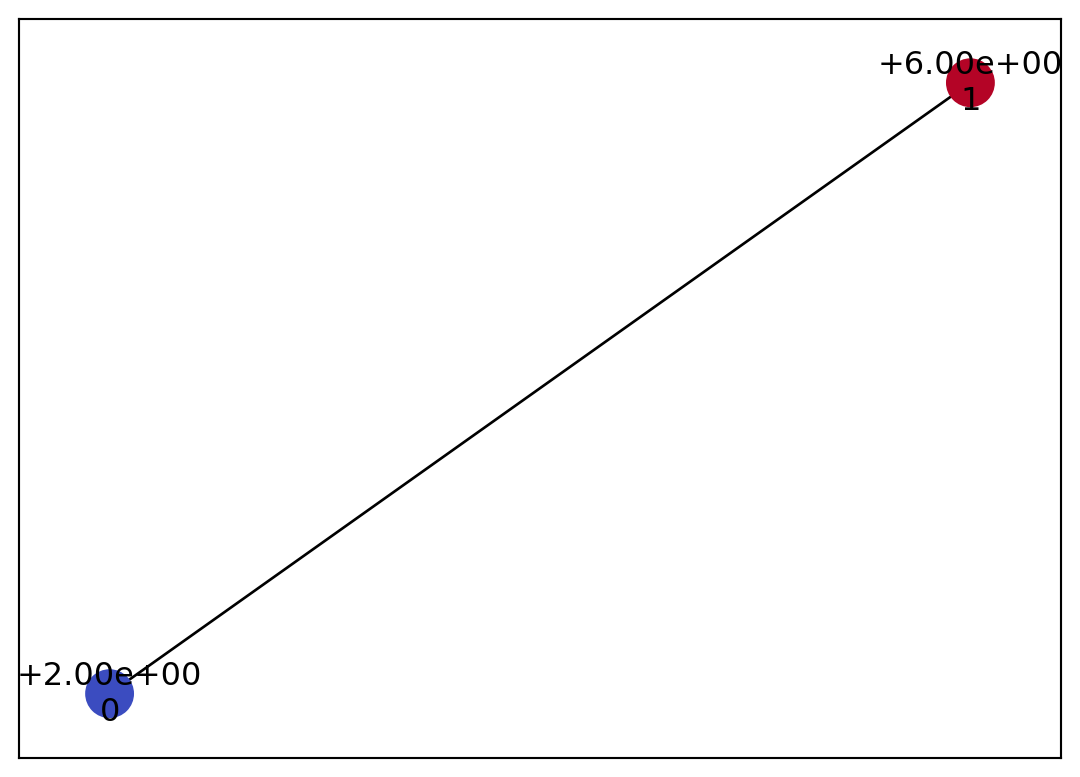
Let’s create a simple Geometry object from scratch. This tutorial does not go into detail about constructing complex Geometry objects. Basically, you can represent the discretization of any geometric shape by adding vertices with add_node and edges with add_edge.

geom = psiclone.data.geometry.Geometry()
n1 = geom.add_node(id=0, level=2, x=3, y=4, geotype=psiclone.data.Geotype.INTERIOR)  # , order)
n2 = geom.add_node(id=1, level=6, x=7, y=8, geotype=psiclone.data.Geotype.EXTERIOR)  # , order)
geom.add_edge(n1, n2)
<psiclone.data.graph.Edge at 0x7fcb3339c050>
psiclone.visualization.draw_geometry(geom)

Reeb Graph

Now we can finally apply our analysis program to the input data. Before moving on to streamline topology analysis, let’s first look at the Reeb graph, which plays an important role in such analysis.

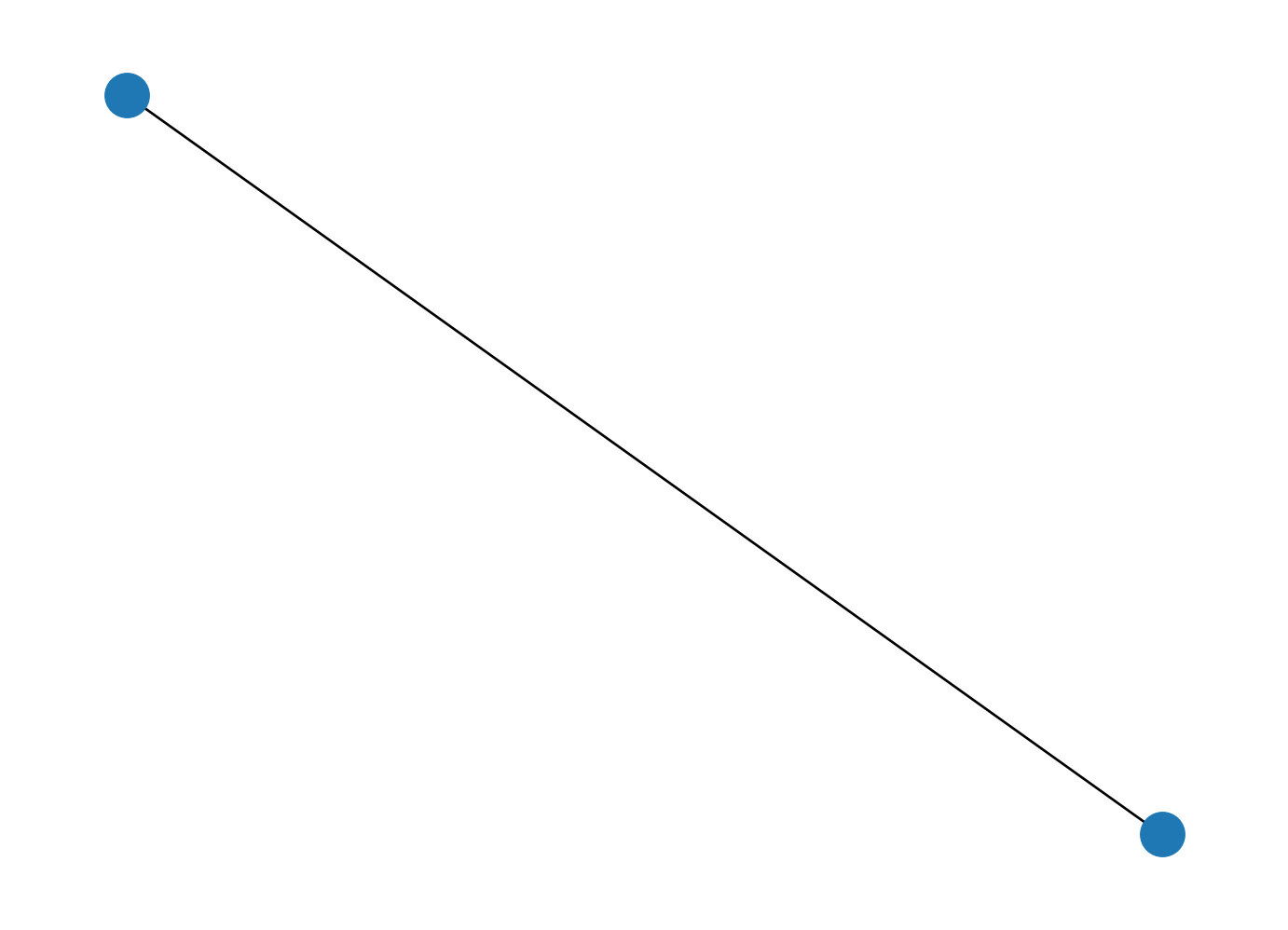
A Reeb graph summarizes the topological structure of contour lines using a graph representation. It can be computed using the psiclone.reeb.get_reeb_graph function. However, for the simple input data we’ve handled so far, the topology is trivial, so the resulting Reeb graph is also trivial.

reeb = psiclone.reeb.get_reeb_graph(img)
networkx.draw(reeb.to_network())

Let’s construct a simple nontrivial example.

y, x = numpy.mgrid[-2:3, -2:3]
f = x * x - y * y
f
array([[ 0, -3, -4, -3,  0],
       [ 3,  0, -1,  0,  3],
       [ 4,  1,  0,  1,  4],
       [ 3,  0, -1,  0,  3],
       [ 0, -3, -4, -3,  0]])
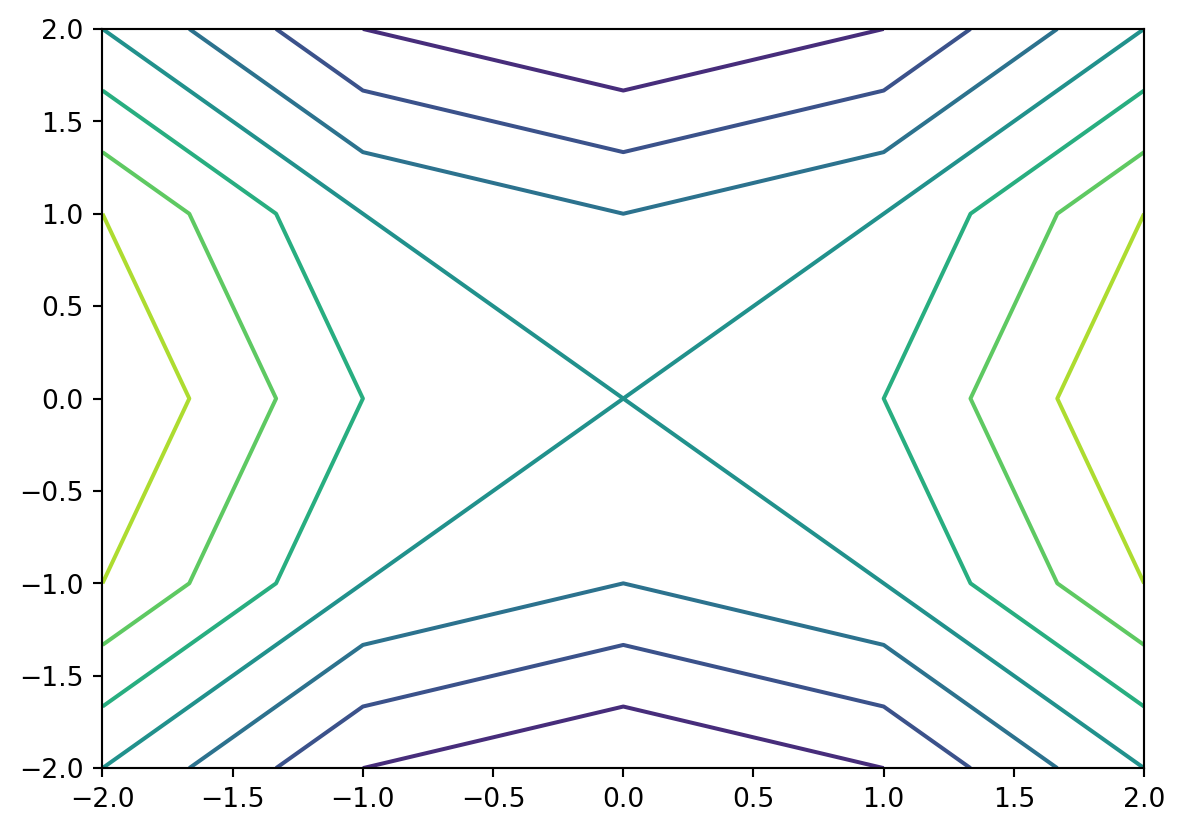
plt.contour(x, y, f)

As you can see, this is a (5,5) grid sample of the height function f(x,y)=x2y2. This function has a saddle point at the origin, and the topology of its contour lines changes across the height level f=0. Now, let’s look at the corresponding Reeb graph.

plt.figure(figsize=(8, 8))

img = psiclone.data.GrayscaleImage(f)
reeb = psiclone.reeb.get_reeb_graph(img)
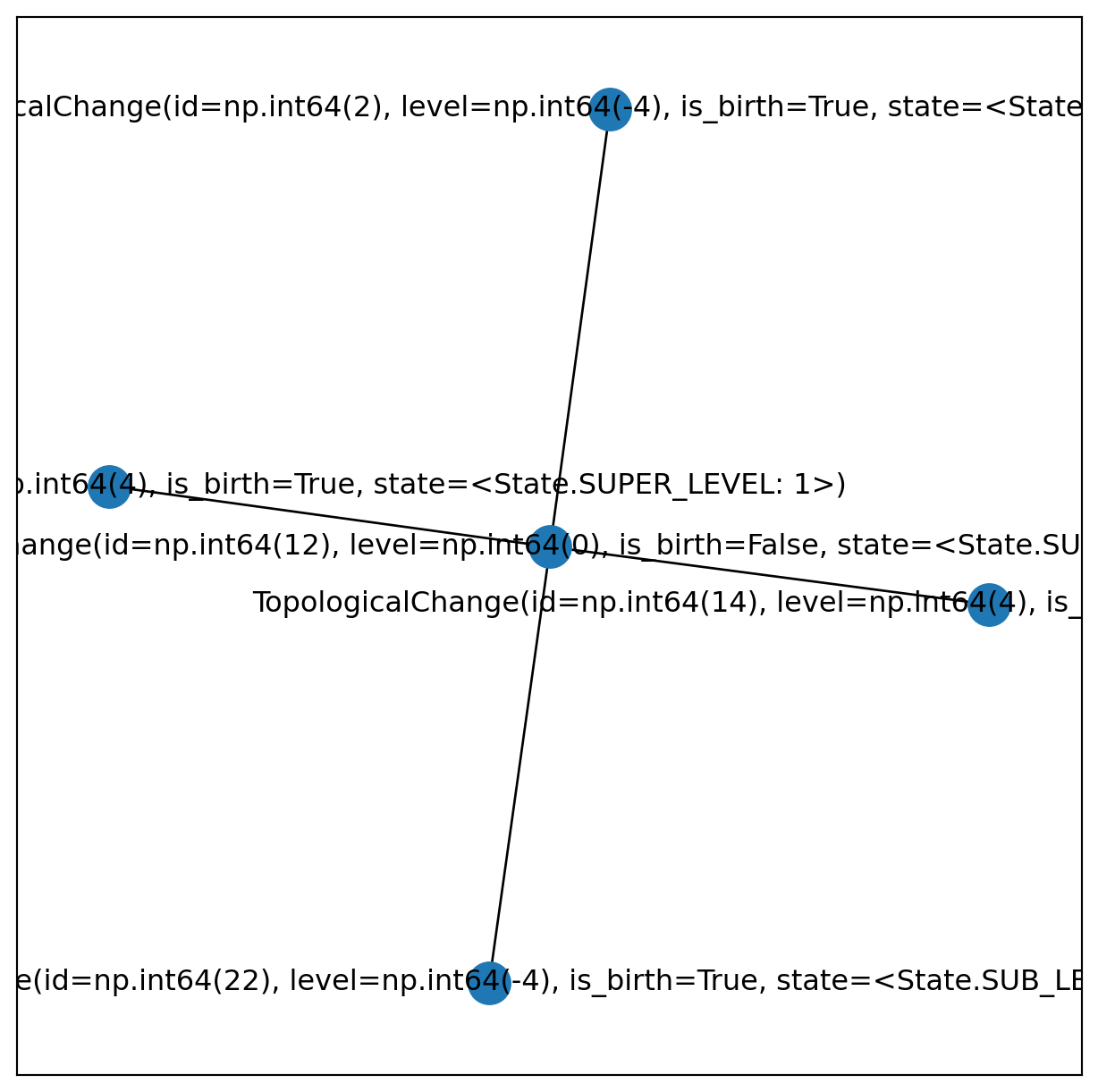
networkx.draw_networkx(reeb.to_network())

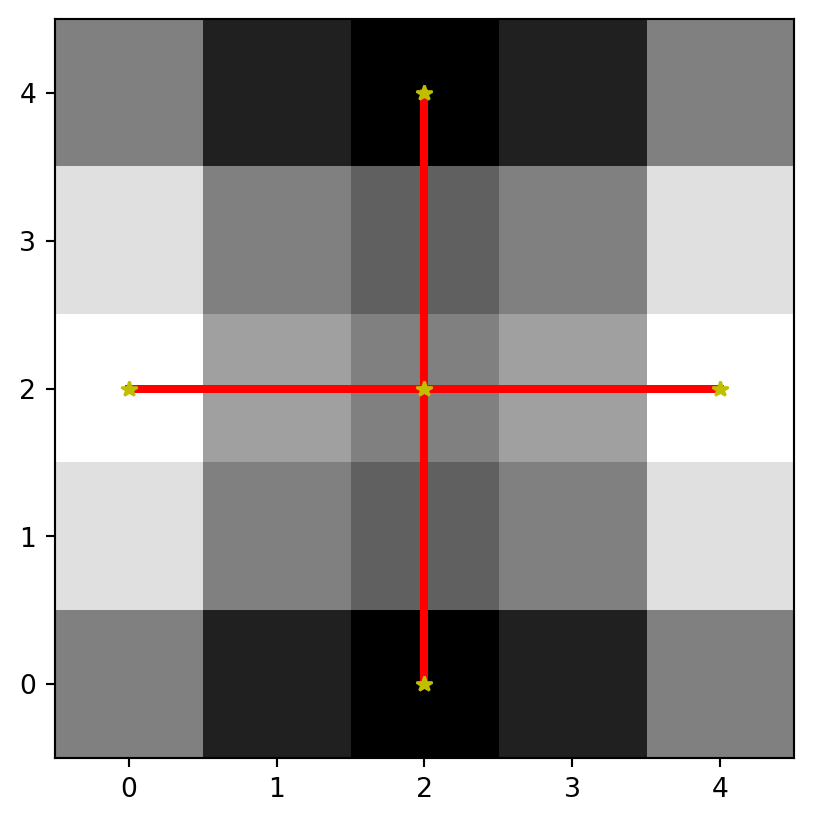
Since the contour lines are divided into four types around the origin, the corresponding node in the Reeb graph at height 0 has degree 4 and branches into four edges. Using psiclone.visualization.draw_graph_markers, you can see where the topological transition points occur in the original data.

plt.imshow(f, origin="lower", cmap="gray")
psiclone.visualization.draw_graph_markers(graph=reeb, geometry=img, lw=3, edge_color="r-")


Exercise: Create a contour plot with your own formula and compute its Reeb graph

# Prepare grid variables using numpy.mgrid[y0:y1:y_divisions*j, x0:x1:x_divisions*j].
# Note: the number of divisions is specified as an integer multiple of the imaginary unit.
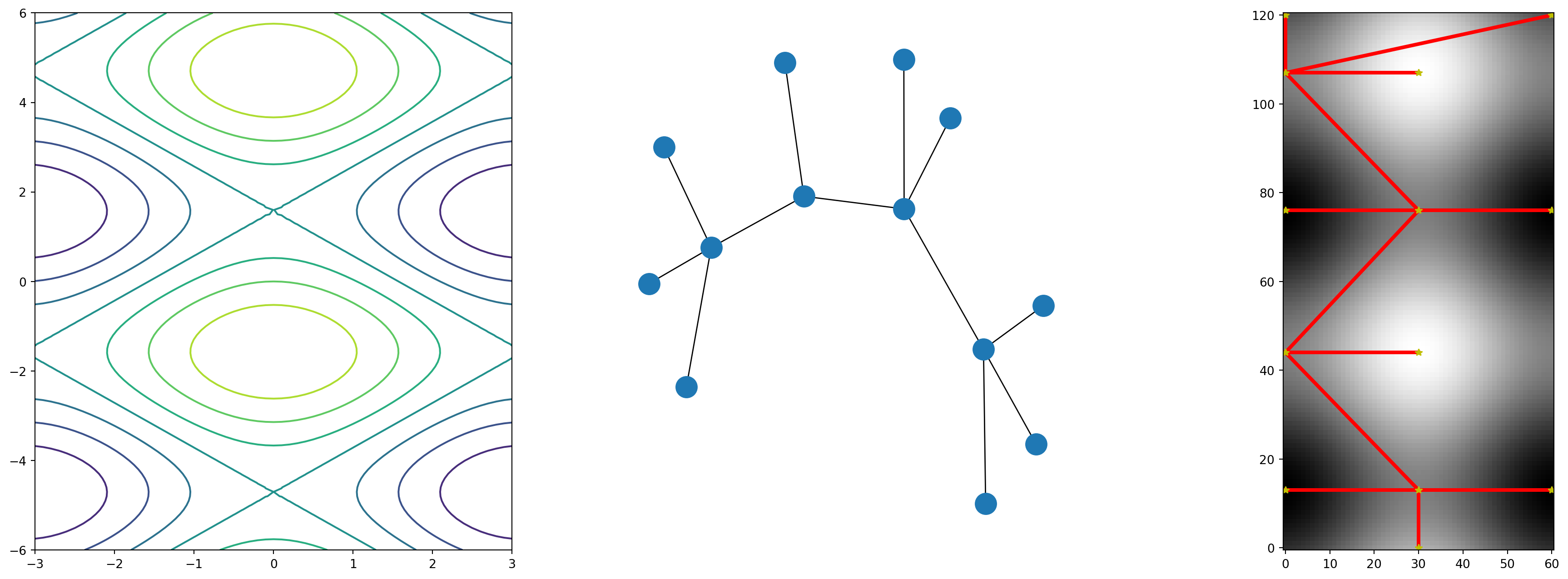
y, x = numpy.mgrid[-6:6:121j, -3:3:61j]
# Enter any expression you like.
f = numpy.cos(x) - numpy.sin(y)
# Convert to a GrayscaleImage and compute its Reeb graph.
img = psiclone.data.GrayscaleImage(f)
reeb = psiclone.reeb.get_reeb_graph(img)

fig = plt.figure(figsize=(24, 8))
fig.add_subplot(1, 3, 1)
plt.contour(x, y, f)

fig.add_subplot(1, 3, 2)
networkx.draw(reeb.to_network())

fig.add_subplot(1, 3, 3)
plt.imshow(f, origin="lower", cmap="gray")
psiclone.visualization.draw_graph_markers(graph=reeb, geometry=img, lw=3, edge_color="r-")


Flow Data Analysis (TFDA)

Uniform Flow Case

We will load input data consisting of multiple (x, y, z) samples under a setup where a single obstacle is placed at the center, and convert it into a COT representation of uniform flow.

import psiclone.visualization as vis
from psiclone.psi2tree import Psi2tree
from psiclone.util.convert import convert_array_to_geometry

So far, we have imported modules using regular import statements, but for frequently used components, it is more convenient to use from ... import directly. Here, we will perform streamline topology analysis using Psi2tree and convert_array_to_geometry. Let’s start by creating some test data.

y, x = numpy.mgrid[-3:3:101j, -3:3:101j]
z = x + y * 1j
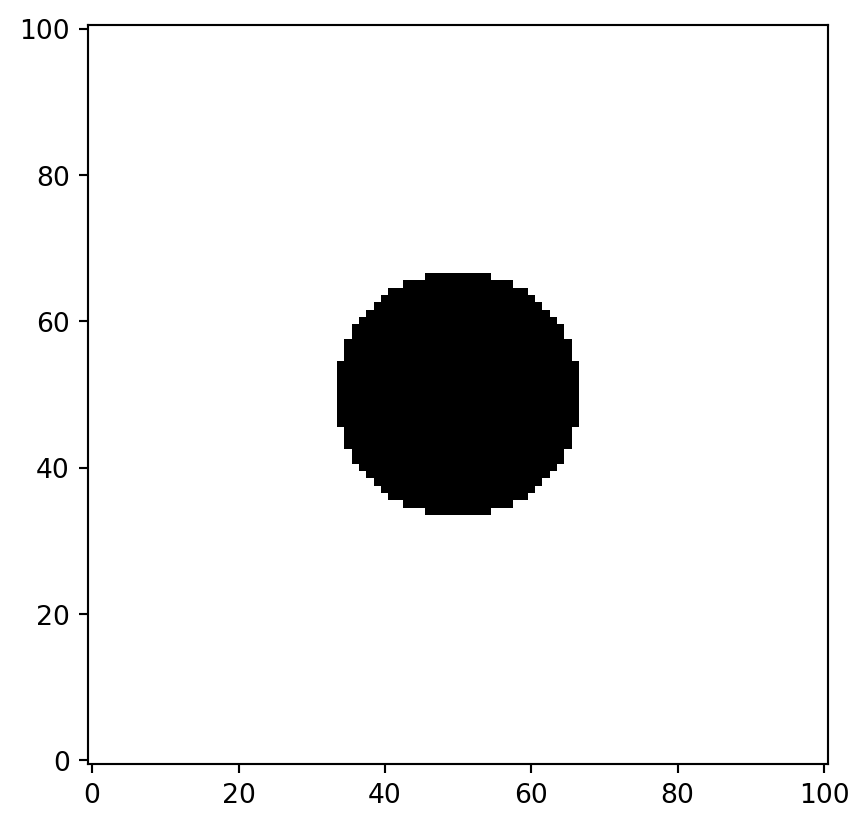
flow_domain = numpy.abs(z) >= 1.0
obstacle_domain = ~flow_domain  # negation

plt.imshow(flow_domain, cmap="gray", origin="lower")

We created a mesh grid and defined a complex variable z=x+y1 using the imaginary unit 1j. We consider the flow region with a circular obstacle at the center as {z:|z|1}.

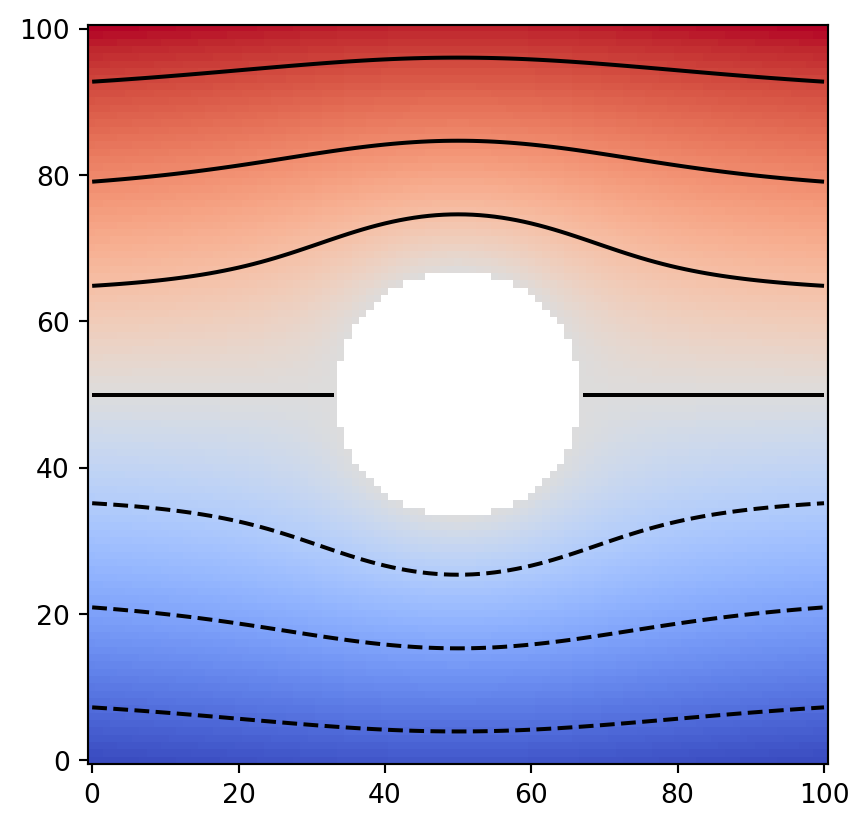
To represent data over this region, numpy.ma.masked_array is useful. It is a special type of array that allows specifying missing regions using a mask. Except for the masked regions, it behaves like a regular numpy.ndarray. Now, using the complex variable z and masked_array, we define the following stream function.

z = numpy.ma.masked_array(z, obstacle_domain)
W = z + 1.0 / z
data = numpy.imag(W)
plt.imshow(data, cmap="coolwarm", origin="lower")
plt.contour(data, colors="k")

Now we have created a test dataset representing uniform flow around a circular obstacle. Next, we will convert this into a Geometry object.

table = numpy.ma.masked_array([x, y, data]).reshape((3, -1)).T
table.shape
(10201, 3)

We use the utility function psiclone.util.convert.convert_array_to_geometry to construct a Geometry object for the uniform-flow setup with obstacles. To do this, we first prepare a masked array of tabular data in the form of x, y, f(x, y) arranged as an N×3 table. (Instead of using a masked array, you may also use data that represents missing regions with nan values or simply omit the missing entries altogether.)

This function accepts several optional arguments. Here, we specify the argument obstacles to indicate the obstacle coordinates — in this example, we designate only one obstacle at the origin, providing a single representative coordinate for each obstacle.

geom = convert_array_to_geometry(table, obstacles=[(0, 0)])
geom, len(geom.nodes), len(geom.edges)
(<psiclone.data.geometry.Geometry at 0x7fcb2cc7c2f0>, 9325, 18476)

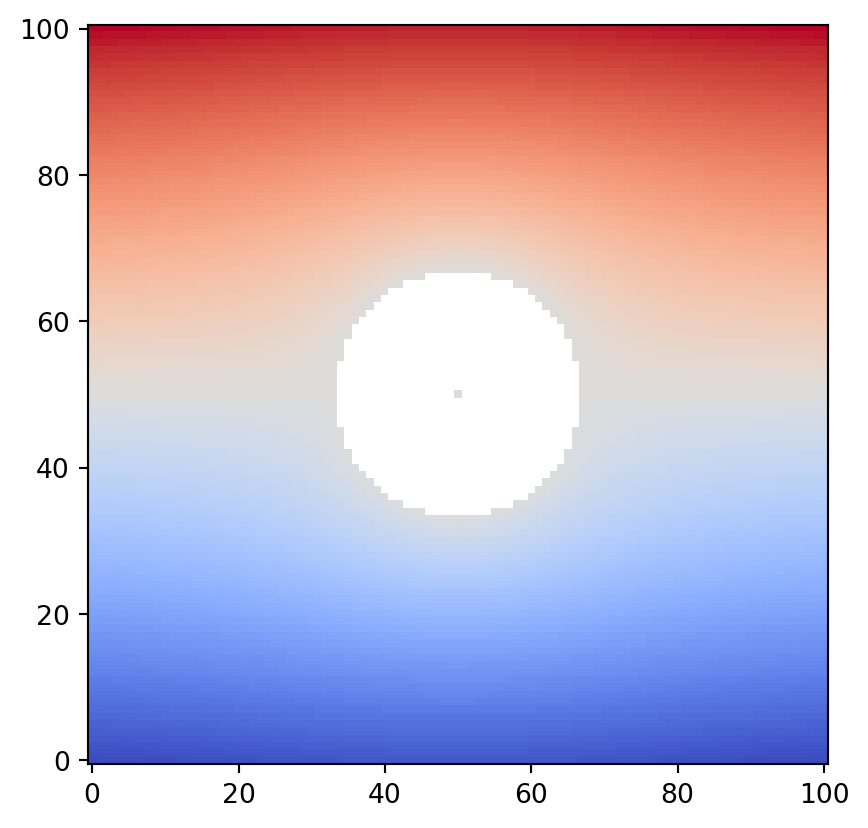
Let’s check whether the constructed geom corresponds to the same data as before. Now that we finally have the input data ready, the next step is the TFDA process!

vis.draw_geometry(geom, bitmap=True)

Converting Input Data to the COT Representation:psiclone.psi2tree.Psi2tree

Now we will compute the partially Cyclically Ordered rooted Tree (COT) representation using the Geometry as input data. This is done with the psiclone.psi2tree.Psi2tree class — its name comes from “psi (ψ) to tree”.

psi2tree = Psi2tree(geom, threshold=0.0)
psi2tree.compute()

The computation is executed via the compute method. Depending on the input data, this process can be time-consuming, so it may be necessary to set an appropriate noise-removal threshold using the threshold argument. Since topology computation for extremely large input data can take a long time, resizing the data to a smaller scale can also be effective.

Once the computation is complete, you can retrieve the result using the get_tree method. The tree structure obtained from get_tree can then be converted into a more human-readable format using the convert method.

from psiclone.cot import to_str

psi2tree.get_tree().convert(to_str)
'a0(a2(L+,L-))'

Output Formats of the COT Representation

By passing one of the following functions to the convert method, you can transform the COT representation into various output formats:

  • psiclone.cot.to_str
  • psiclone.cot.to_short_str
  • psiclone.cot.to_tex
  • psiclone.cot.to_short_tex

to_(short_)str converts the representation into a simple ASCII format without Greek characters, while to_(short_)tex produces a TeX format with correct subscripts and Greek-letter labels. The short_ versions are more compact, omitting redundant symbols while preserving information. You can also customize recursive transformations by providing your own conversion function to convert.

from IPython.display import Math, display

from psiclone.cot import to_short_str, to_short_tex

cot_tree = psi2tree.get_tree()
print(cot_tree.convert(to_short_str))
print(cot_tree.convert(to_short_tex))
display(Math(cot_tree.convert(to_short_tex)))
a0(a2)
a_\emptyset(a_2)

a(a2)

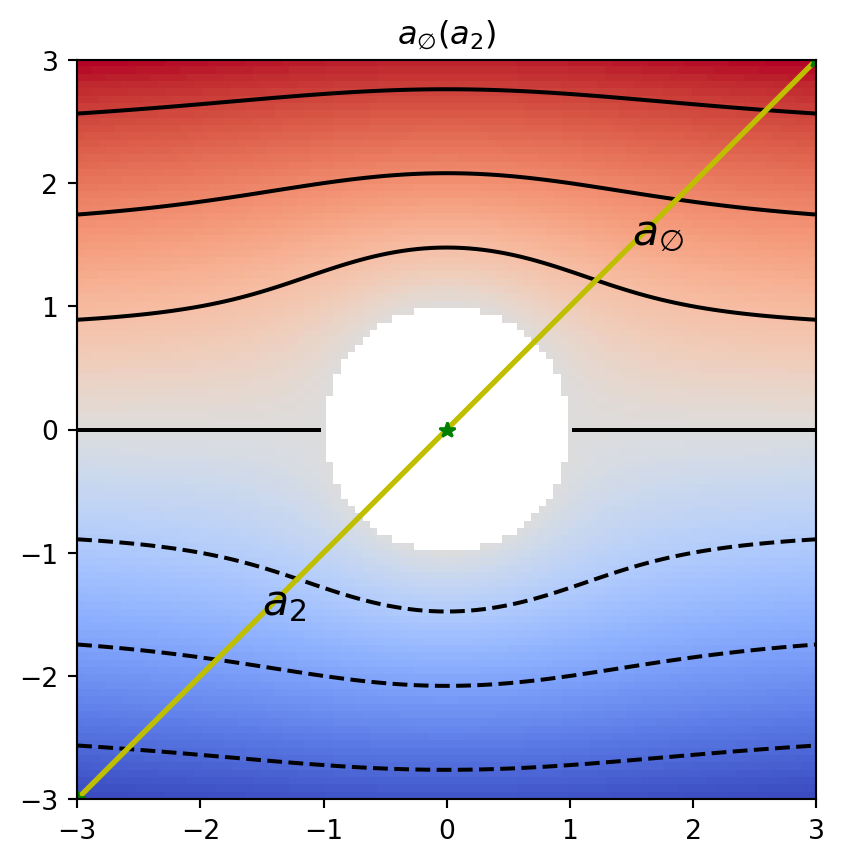
Let’s overlay the input data, contour plot, Reeb graph, and COT representation for visualization.

plt.title(f"${psi2tree.get_tree().convert(to_short_tex)}$")
plt.imshow(data, cmap="coolwarm", origin="lower", extent=[numpy.amin(x), numpy.amax(x), numpy.amin(y), numpy.amax(y)])
plt.contour(x, y, data, colors="k")
vis.draw_graph_markers(psi2tree, lw=2, edge_color="y-", node_color="g*")
vis.draw_COT_labels(psi2tree, fontsize=16)


Exercise: Apply a Slight Perturbation and Observe the Result

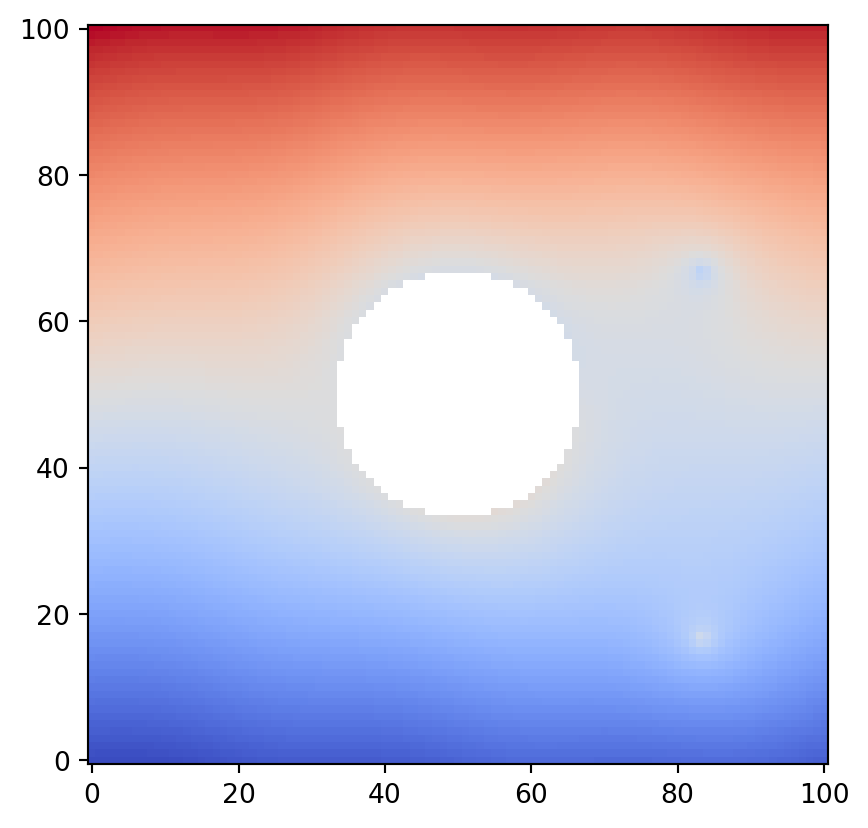
Let’s add a small perturbation to the uniform flow example above and observe the resulting computation.

However, if the perturbation is too large, noise may not be properly removed, causing failures in Reeb graph or COT computation. Here, we set threshold=1.0e-1 as the noise-removal threshold, so interesting structures should exist on scales larger than this, while noise should occur at smaller scales.

y, x = numpy.mgrid[-3:3:101j, -3:3:101j]
z = x + y * 1j
flow_domain = numpy.abs(z) >= 1.0
obstacle_domain = ~flow_domain

z = numpy.ma.masked_array(z, obstacle_domain)
W = z + 1.0 / z
perturbation = 4.0e-2 * numpy.sin(numpy.pi * x)
perturbation += 0.3 * numpy.log(numpy.abs(z - (2.0 + 1.0j)))
perturbation -= 0.3 * numpy.log(numpy.abs(z - (2.0 - 2.0j)))
data = numpy.imag(W) + flow_domain * perturbation

plt.imshow(data, origin="lower", cmap="coolwarm")
/tmp/ipykernel_3236/2062294558.py:9: RuntimeWarning:

divide by zero encountered in log

/tmp/ipykernel_3236/2062294558.py:10: RuntimeWarning:

divide by zero encountered in log

table = numpy.ma.masked_array([x, y, data]).reshape((3, -1)).T
geom = convert_array_to_geometry(table, obstacles=[(0, 0)])
psi2tree = Psi2tree(geom, threshold=1.0e-1)

cot_tree = None
cot_tex = "\\rm Error"
try:
    psi2tree.compute()
    cot_tree = psi2tree.get_tree()
    cot_tex = cot_tree.convert(to_short_tex)
except Exception as e:
    print(e)

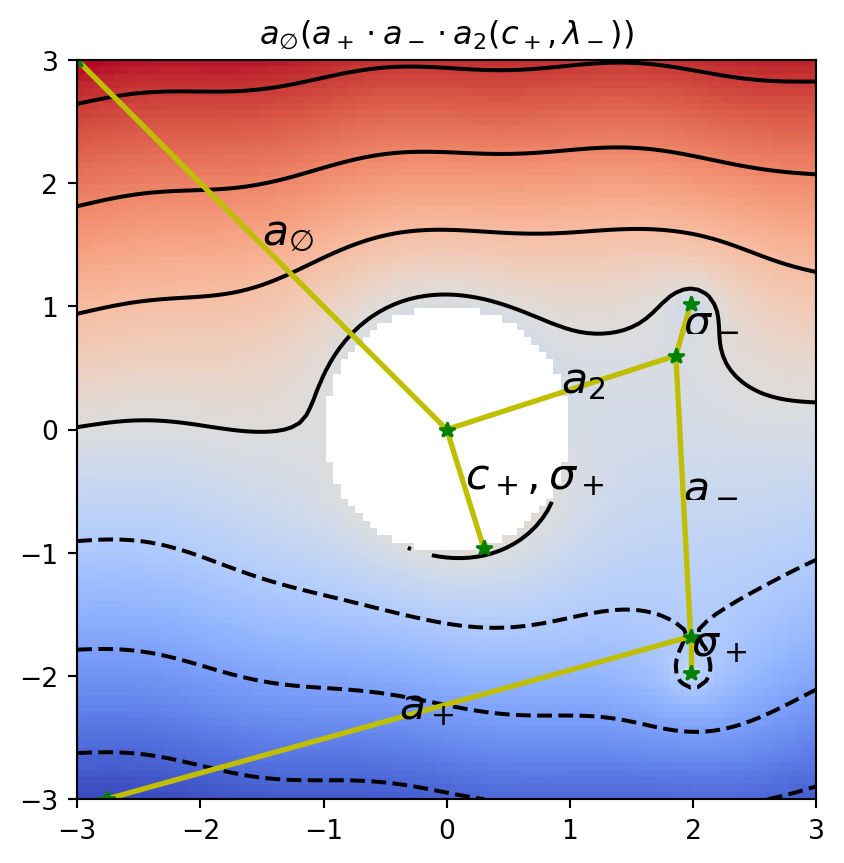
plt.title(f"${cot_tex}$")
plt.imshow(data, cmap="coolwarm", origin="lower", extent=[numpy.amin(x), numpy.amax(x), numpy.amin(y), numpy.amax(y)])
plt.contour(x, y, data, colors="k")
vis.draw_graph_markers(psi2tree, lw=2, edge_color="y-", node_color="g*")
if cot_tree is not None:
    vis.draw_COT_labels(psi2tree, fontsize=16)

Visualizing Partitions

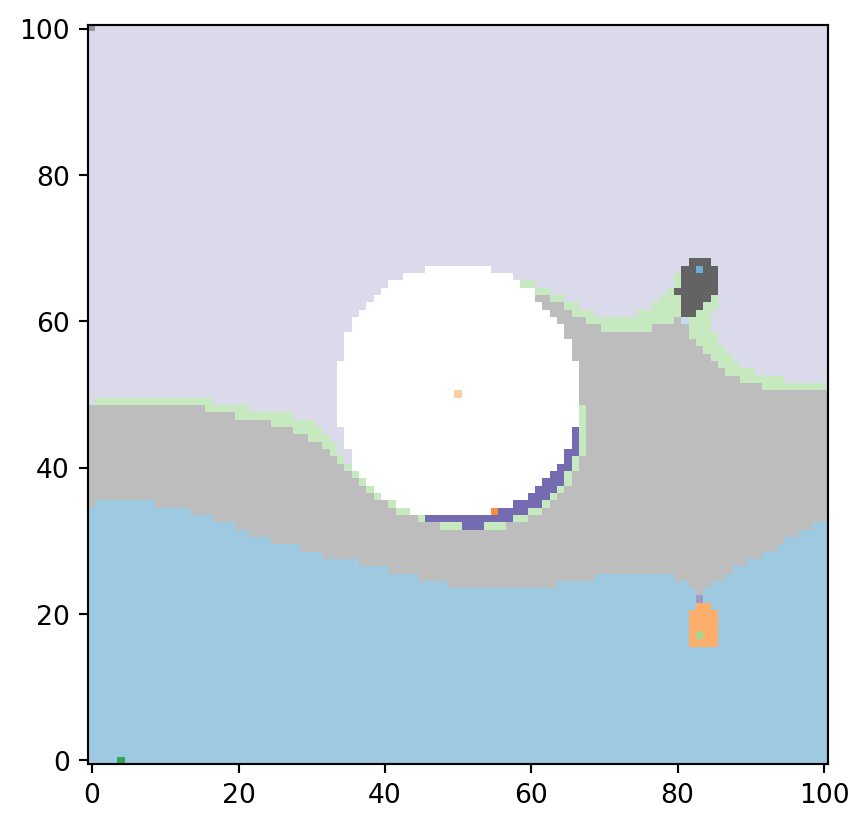
Mathematically, a Reeb graph is defined as a quotient space under an equivalence relation. The algorithm used in psiclone also yields a partition of space based on such equivalence relations.

To visualize this partition, the function psiclone.visualization.draw_partition is useful. By examining this, you can get an intuitive sense of how psiclone captures streamline topology through the Reeb graph.

vis.draw_partition(psi2tree, bitmap=True, discrete=True, cmap="tab20c")