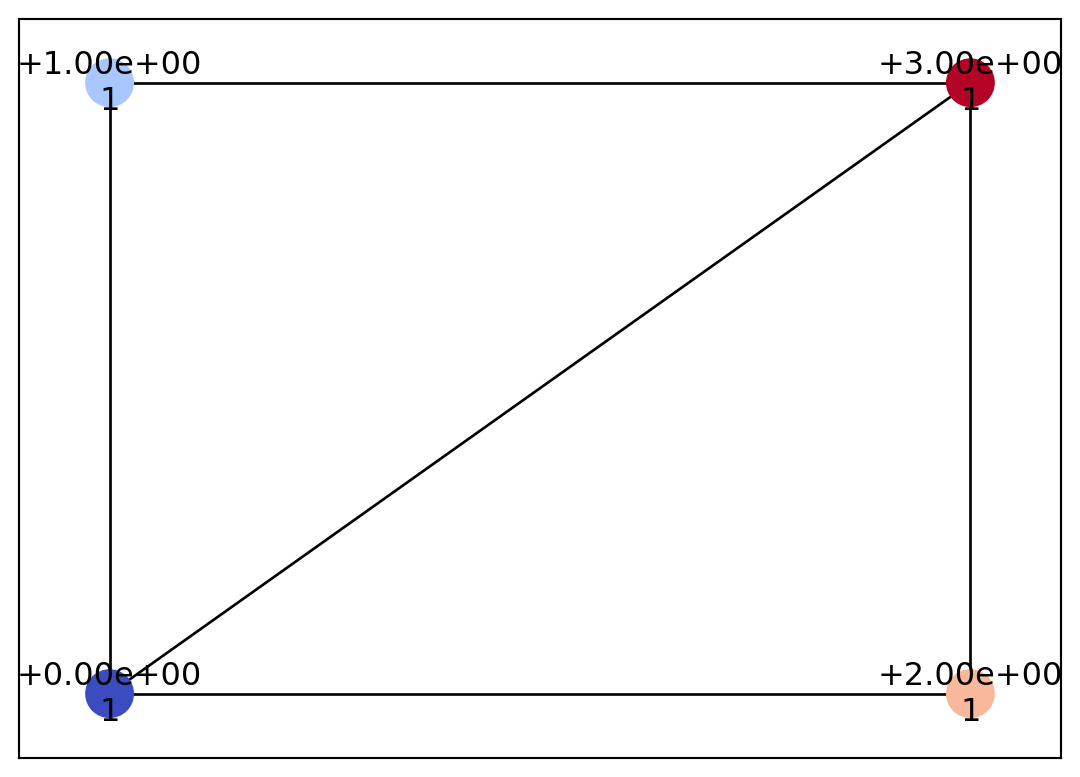
psiclone can handle data in various formats, and internally it always converts any input format into a Geometry object before performing computations. Understanding this process will help you not only see “what kinds of data can (or cannot) be handled,” but also allow you to use psiclone with your own custom data formats if needed. Below, we directly construct a simple Geometry object and explain the overall workflow.
As an example, let us create a Geometry object geom in the shape of the symbol 〼. This object is an (undirected) graph whose nodes carry associated information. Each node must be assigned the following variables:
id: node ID
x: x-coordinate of the node
y: y-coordinate of the node
level: vorticity of the node
geotype: this will be explained in another tutorial. Since it is a required argument, we will temporarily assign Geotype.EXTERIOR here.
When adding edges, specify which nodes are the endpoints.
Finally, visualize geom using draw_geometry. Note that if edge_color is not specified, the edges may appear white and thus become invisible.
Process this input data with Psi2tree and convert it into a COT representation. Create the object with Psi2tree(geom, threshold=0.0), then compute the COT representation using psi2tree.compute().
from psiclone.psi2tree import Psi2treepsi2tree = Psi2tree(geom, threshold=0.0)psi2tree.compute()
You can inspect the computed COT representation with the following code.
from psiclone.cot import to_strpsi2tree.get_tree().convert(to_str)
'a0(L~)'
Summary
Regardless of the data format, psiclone always performs computations through a Geometry object. Other tutorials use images or meshes as input data, but note that in every input format there is a common step that generates a Geometry object. If you want to work with data formats that are not supported by psiclone, you can still compute a COT representation in the same way by simply writing code that converts your data into a Geometry object.